Know what you have.
Order before you run out.
Five minutes to set up. Two weeks for the system to learn your store. After that, it tells you when to reorder — for restaurants, liquor stores, bars, and corner markets.
Independent SaaS. Connects to Clover POS so sales auto-decrement stock and reorders fire themselves.
Soul Chicken Hawaii.
Anthony's own restaurants.
Inventory Master wasn't built by engineers guessing what restaurants need. It was built by Anthony Han for his two Korean fried chicken stores in Kalihi and Ke'eaumoku — running production every day at inventory.soulchickenhawaii.com.
Eighteen months of real shifts, real counts, real reorders. When you read "the system suggests," it means the system has been suggesting things in Anthony's kitchen for over a year.
One inventory engine. Four very different storefronts.
The hardware changes — register, scale, scanner. The math changes — perishables, par levels, shot pours. The principle doesn't: count what you have, watch what sells, reorder before you run out.
Track every ingredient, reorder before you run out.
- →Staff count on their phones in 30 seconds
- →Auto-reorder thresholds learned over 2 weeks
- →Vision OCR reads invoices into stock
Bottles in, bottles out. Clover does the math.
- →Per-SKU thresholds with case + bottle units
- →Sam’s Club / Costco URLs become Quick Orders
- →No more end-of-month spreadsheet panic
Smart scale on the back bar. Shots count themselves.
- →Weigh hard liquor bottles, get shot-level accuracy
- →Match Clover sales to ounces poured — see what walked
- →Daily variance report owners can actually trust
Expiring milk? It puts itself on the TV at 30% off.
- →Track expiration on every receipt-date item
- →Auto-discount feeds the in-store TV signage
- →Stop dumpstering inventory you already paid for
Every screen Anthony actually uses.
Not a feature list — eight working modules in production at Soul Chicken right now.
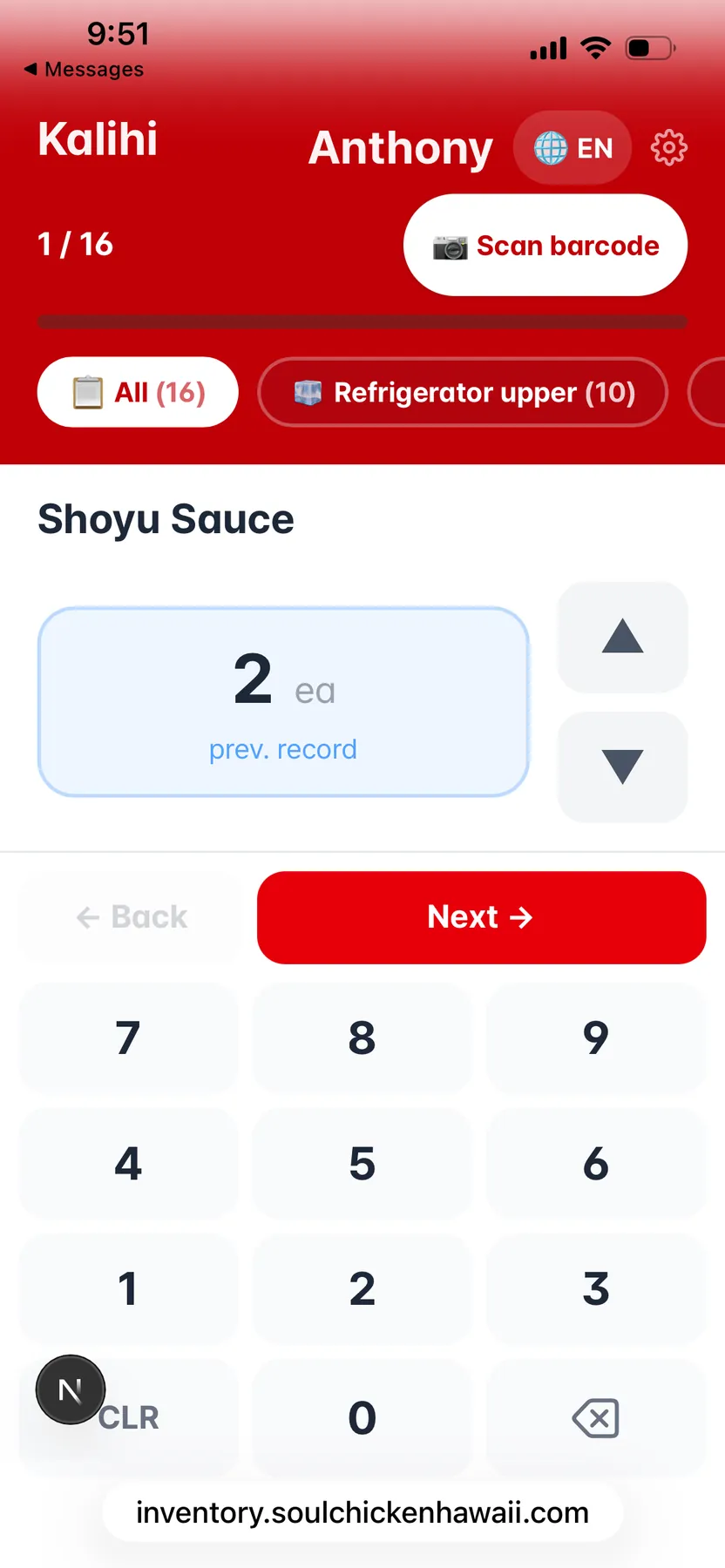
A staff phone is a inventory counter.
Open the link, tap a category, type the number. Box, sleeve, piece — three units, one calculator keypad. No app install, no training. Done in 30 seconds per item.
- →Bilingual (English / 한국어) per item
- →Calculator keypad — staff already know it
- →"Previous record" inline so they know what changed
Cart → Sent → Restocked. Nothing falls through.
When stock hits the learned threshold, the system drafts an order. The owner reviews, taps Send, and the supplier gets it via Email / Telegram / SMS. Failures auto-retry; restocks reconcile.
- →3-stage pipeline with full audit trail
- →Failure tracking + retry — never silently lost
- →Restock reconciliation against the original PO
Snap the invoice. Stock updates itself.
Powered by Claude Sonnet 4.5 vision. Photograph any supplier invoice — handwritten, thermal-printed, foreign language — and it’s parsed against your item catalog. Confirm matches, hit save.
- →Reads handwriting, multiple languages, photos of photos
- →Auto-matches line items against your existing catalog
- →One-tap confirmation per item
Staff first. Owner only when it matters.
Counts due? The on-shift counter gets the ping. No response in 2 hours → reminder. 4 hours → second nudge. Still nothing → owner gets paged. Three channels: SMS, Email, Telegram.
- →Escalation: counter → reminder ×3 → owner
- →Three channels: Twilio SMS, email, Telegram
- →Owner sees who responded and who didn’t
Paste a Sam’s Club URL. Get a quick-order.
URL parsers for Sam’s Club, Costco Business, Amazon. Drop a product link, the item gets created with name, unit, supplier, and link-back. Reorder by tapping a button — it opens the supplier cart pre-loaded.
- →Sam’s Club, Costco Business, Amazon parsers
- →Quick-order links — supplier cart opens pre-filled
- →Email / Telegram / SMS dispatch per supplier
Same engine. Every store its own brand.
Each location runs in complete isolation — its own inventory, its own staff, its own brand color. Spinning up store #2? Clone setup, change the color, you’re live in five minutes.
- →Per-store inventory, staff, suppliers, thresholds
- →Per-store brand color — runtime CSS variable
- →Copy Setup workflow for new locations
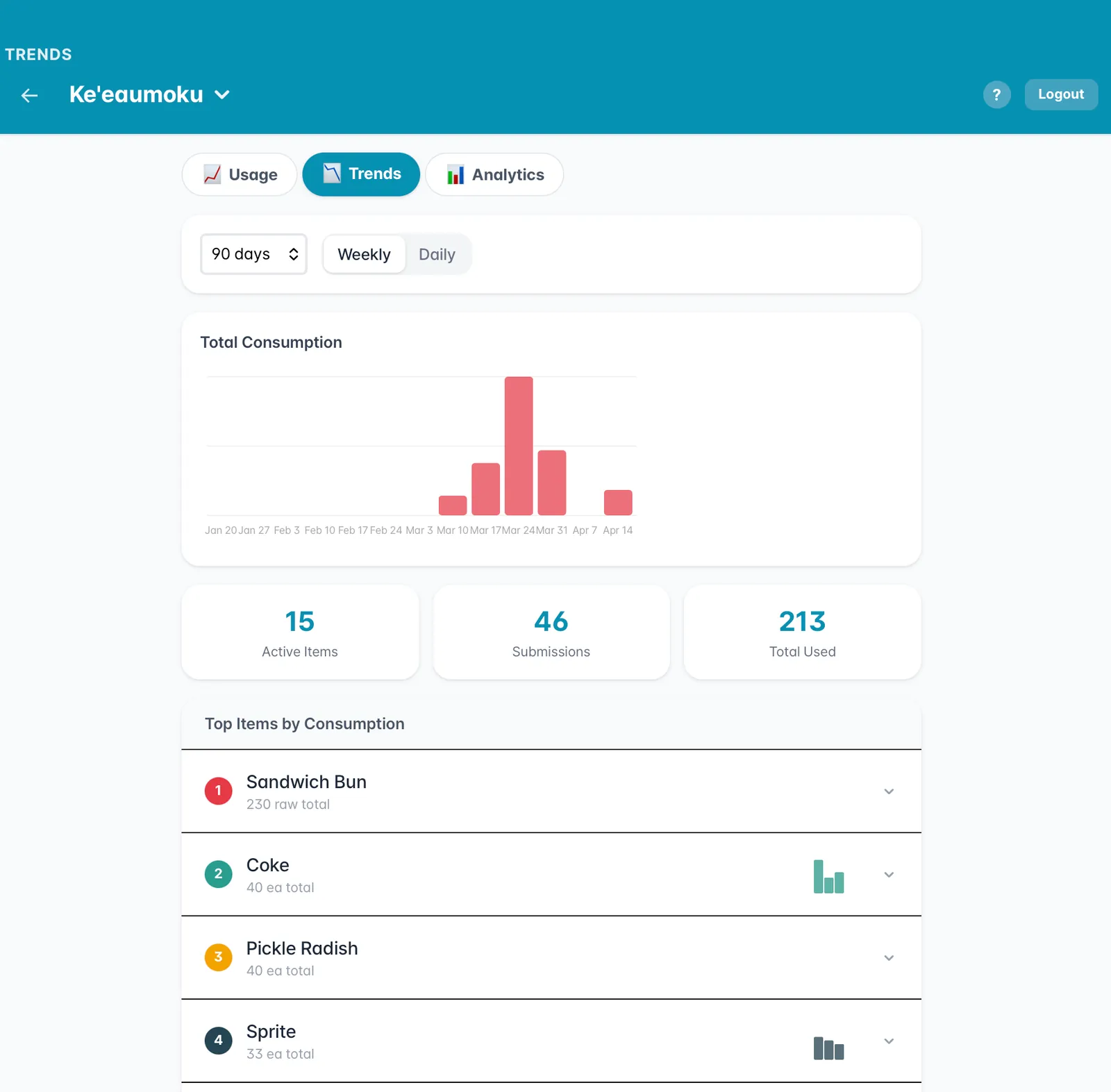
90 days of "what actually moves."
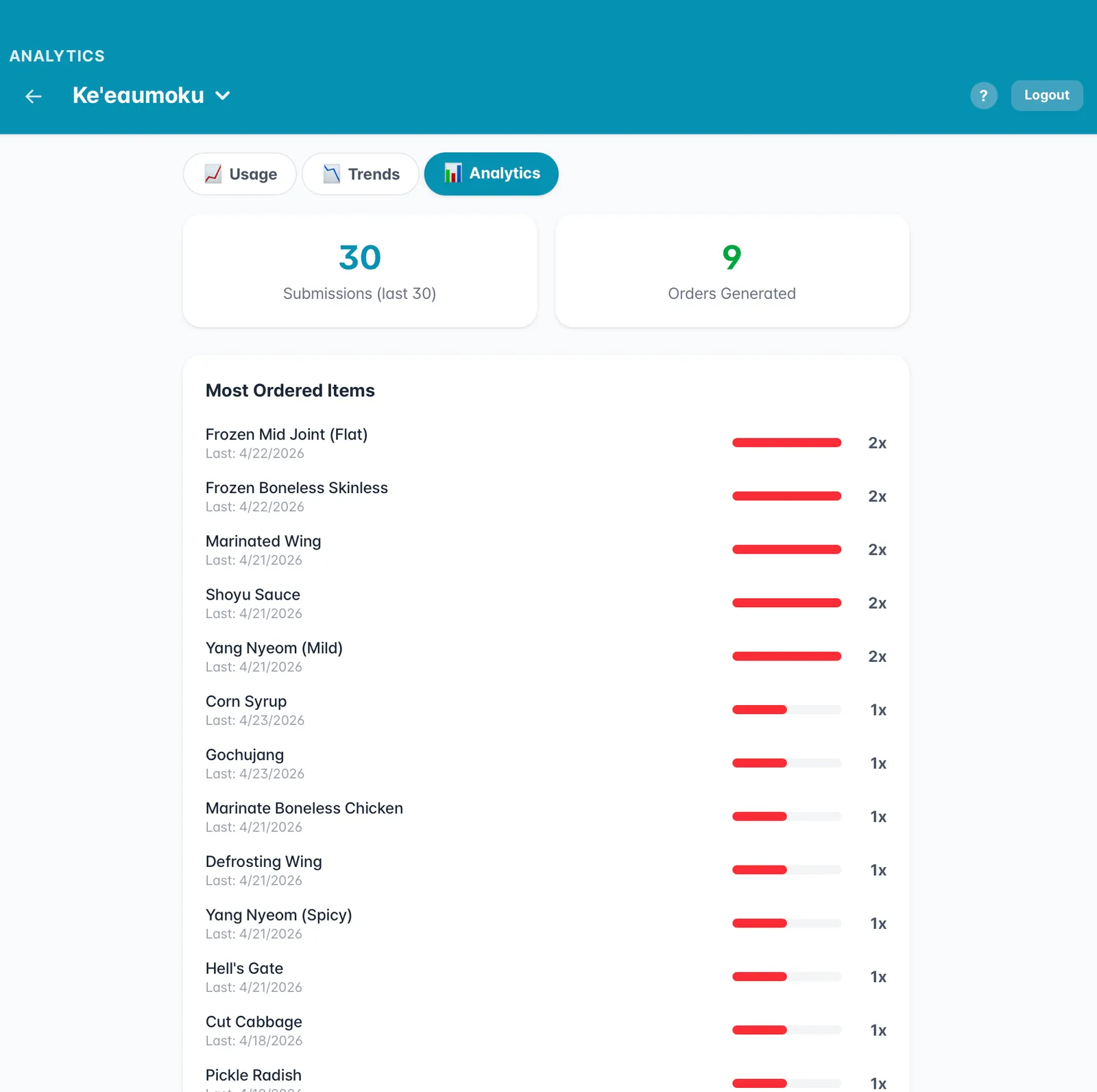
Top items by consumption. Most ordered. ↑↓ vs last week, last month. The numbers an owner needs to negotiate with suppliers — without exporting to Excel.
- →90-day usage curves per item
- →Top-N by consumption + most-ordered ranks
- →Per-store + roll-up across locations
Raw → prepped, automatically deducted.
When the kitchen marinates 20 lbs of boneless, raw chicken stock drops by 20, prepped chicken stock goes up by 20. One pipeline definition, one tap, the books reconcile.
- →Define raw → prepped recipes once
- →One-tap conversion at the prep station
- →Stock reconciles automatically across both items
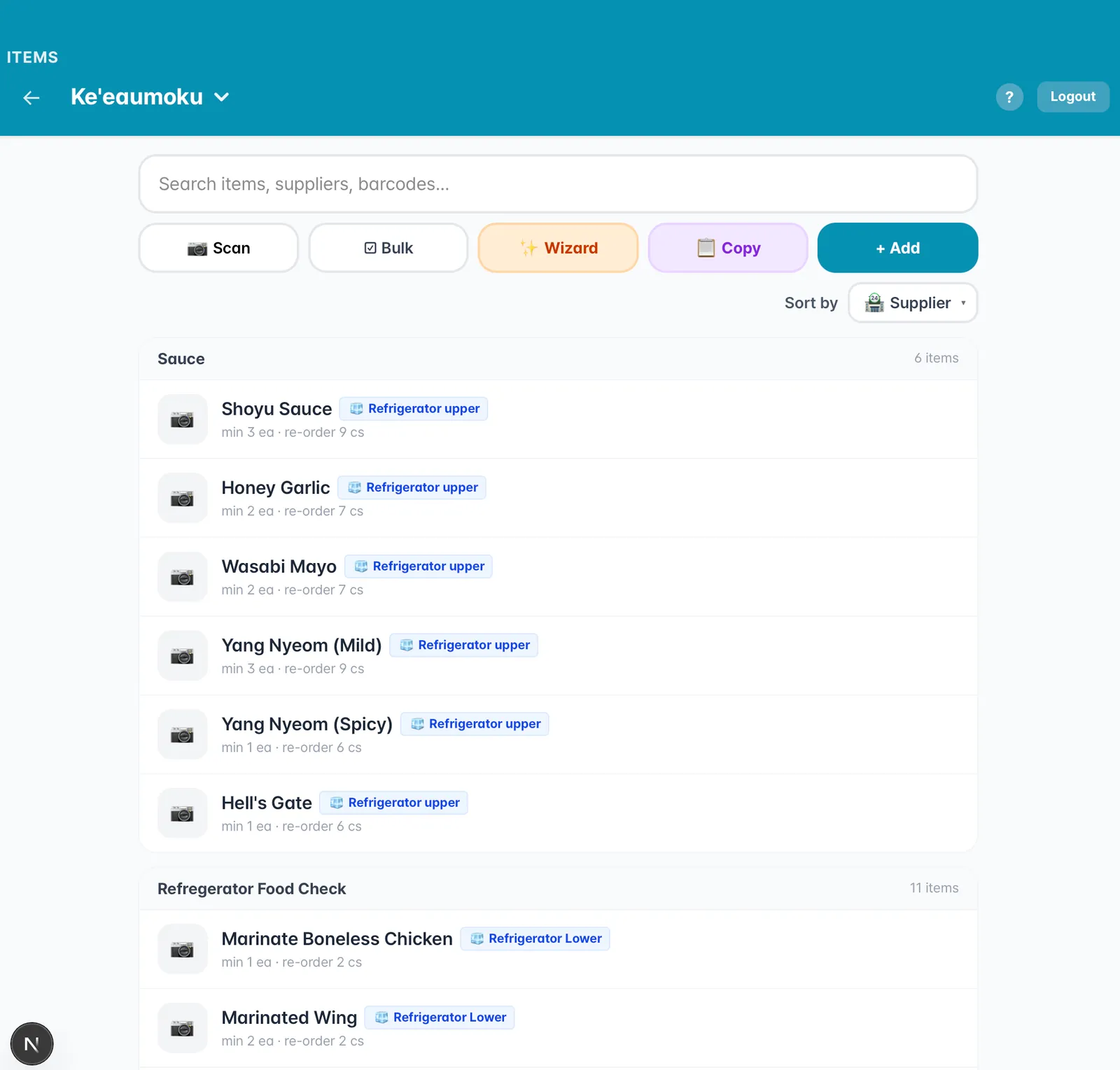
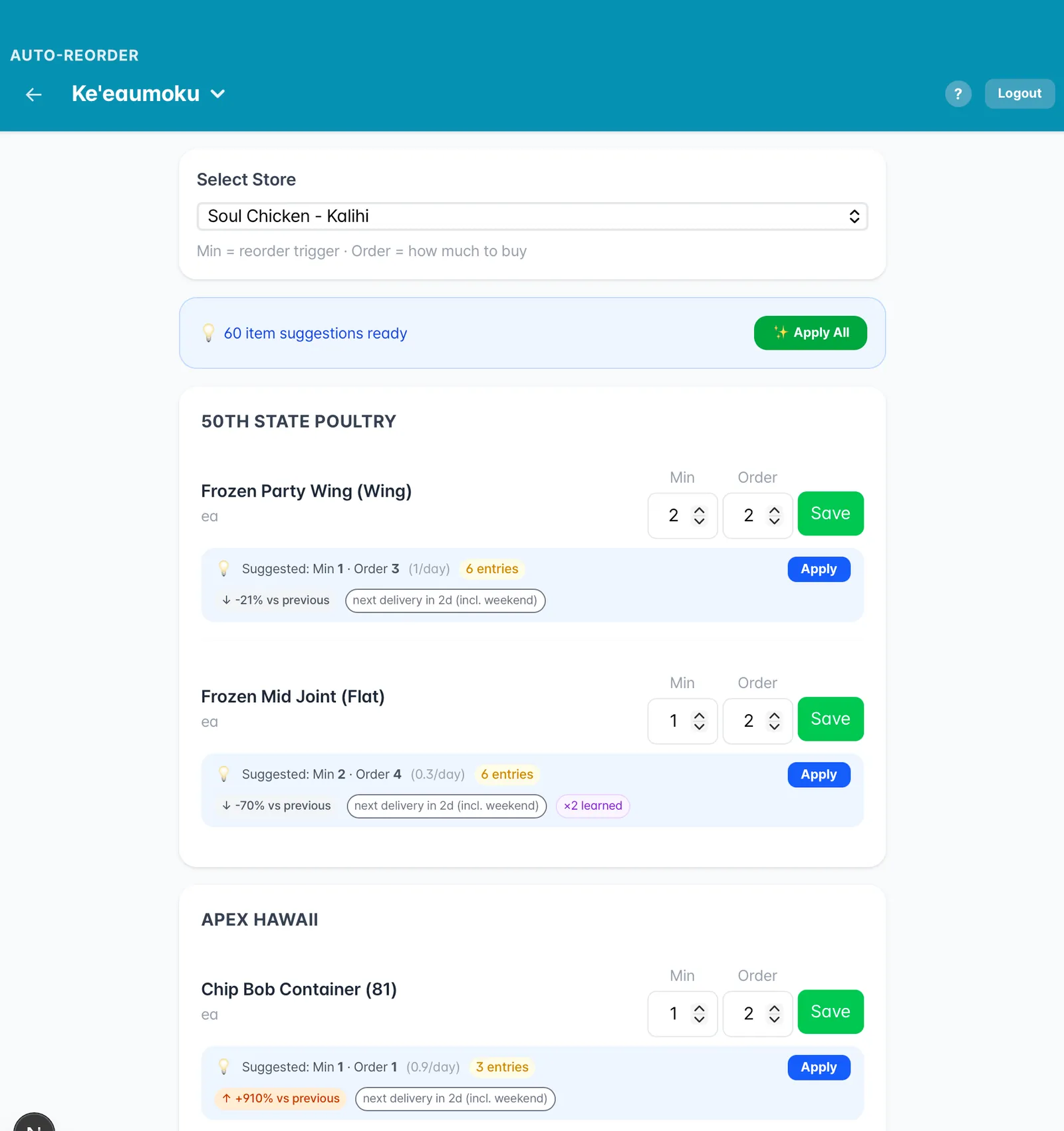
We learn your store. You don't fill out a form.
Other systems make you input lead times, par levels, reorder points. That's jargon for "we don't want to do this work, you do it."
Inventory Master watches the actual counts for two weeks, then drops sixty suggestions on your screen. Apply them all, or tweak each one. That's the setup.
Sixty suggestions. One Apply All button.
"Suggested: Min 1 · Order 3 (1/day)" — that's the system telling you "we've seen this item move at one per day, here's the reorder math we'd recommend."
Note the "×2 learned" tag — that's the system telling you the math has been refined twice as new data came in. Velocity changes; the suggestions follow.
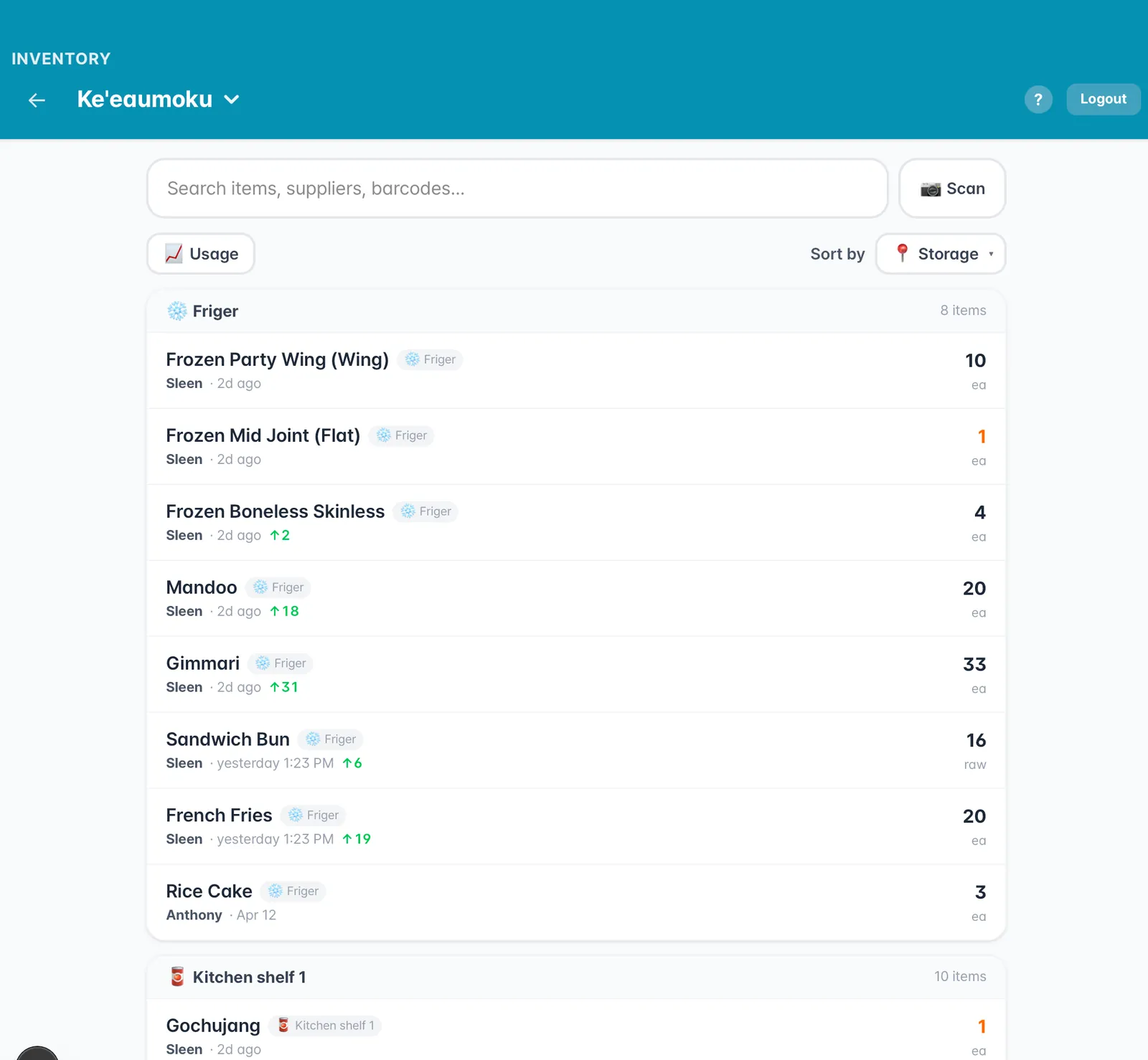
Clover sells it. We count it. The loop closes itself.
Inventory Master runs standalone — Soul Chicken proves that. But the magic happens when it talks to Clover POS. Every sale becomes a stock event. Every stock event can fire a reorder. The owner does nothing.
Honolulu-built, modern stack.
- Staff phones (BYOD)
- Tablet for admin
- Barcode scanner (optional)
- Smart scale — Bar mode, 2026
- Next.js 16 + Tailwind v4
- Prisma + Postgres
- Multi-tenant per store
- Mobile-first PWA
- Clover POS — OAuth + webhooks
- Twilio SMS
- Telegram bot API
- Sam’s Club / Costco / Amazon parsers
- Claude Sonnet 4.5 — Vision OCR
- Learned reorder suggestions
- Velocity modeling per SKU
The roadmap is hardware, not features.
Restaurant mode is mature. Liquor stores join via Clover this year. The next two modes need a piece of hardware — a scale, a TV. We’re building both.
Smart scale on the back bar.
Hard liquor bottles sit on a connected scale. Pour a shot, the bottle gets lighter, the system sees it. Match against Clover sales — variance becomes visible. The oldest unsolved problem in hospitality, finally measurable.
Expiring milk → 30% off on the in-store TV.
Track receipt-date items. As expiration approaches, the system marks down and pushes the discount to your in-store TV via Display Network. Stop dumpstering inventory you already paid for.
Five minutes to set up.
Two weeks to learn.
The first visit is free. No obligation.
See Soul Chicken’s live system, then we’ll spin up your tenant. Your brand color, your suppliers, your first count by Friday.
See Soul Chicken live →Know what you have.
Order before you run out.
Five minutes to set up. Two weeks for the system to learn your store. After that, it tells you when to reorder — for restaurants, liquor stores, bars, and corner markets.
Independent SaaS. Connects to Clover POS so sales auto-decrement stock and reorders fire themselves.
Soul Chicken Hawaii.
Anthony's own restaurants.
Inventory Master wasn't built by engineers guessing what restaurants need. It was built by Anthony Han for his two Korean fried chicken stores in Kalihi and Ke'eaumoku — running production every day at inventory.soulchickenhawaii.com.
Eighteen months of real shifts, real counts, real reorders. When you read "the system suggests," it means the system has been suggesting things in Anthony's kitchen for over a year.
One inventory engine. Four very different storefronts.
The hardware changes — register, scale, scanner. The math changes — perishables, par levels, shot pours. The principle doesn't: count what you have, watch what sells, reorder before you run out.
Track every ingredient, reorder before you run out.
- →Staff count on their phones in 30 seconds
- →Auto-reorder thresholds learned over 2 weeks
- →Vision OCR reads invoices into stock
Bottles in, bottles out. Clover does the math.
- →Per-SKU thresholds with case + bottle units
- →Sam’s Club / Costco URLs become Quick Orders
- →No more end-of-month spreadsheet panic
Smart scale on the back bar. Shots count themselves.
- →Weigh hard liquor bottles, get shot-level accuracy
- →Match Clover sales to ounces poured — see what walked
- →Daily variance report owners can actually trust
Expiring milk? It puts itself on the TV at 30% off.
- →Track expiration on every receipt-date item
- →Auto-discount feeds the in-store TV signage
- →Stop dumpstering inventory you already paid for
Every screen Anthony actually uses.
Not a feature list — eight working modules in production at Soul Chicken right now.
A staff phone is a inventory counter.
Open the link, tap a category, type the number. Box, sleeve, piece — three units, one calculator keypad. No app install, no training. Done in 30 seconds per item.
- →Bilingual (English / 한국어) per item
- →Calculator keypad — staff already know it
- →"Previous record" inline so they know what changed
Cart → Sent → Restocked. Nothing falls through.
When stock hits the learned threshold, the system drafts an order. The owner reviews, taps Send, and the supplier gets it via Email / Telegram / SMS. Failures auto-retry; restocks reconcile.
- →3-stage pipeline with full audit trail
- →Failure tracking + retry — never silently lost
- →Restock reconciliation against the original PO
Snap the invoice. Stock updates itself.
Powered by Claude Sonnet 4.5 vision. Photograph any supplier invoice — handwritten, thermal-printed, foreign language — and it’s parsed against your item catalog. Confirm matches, hit save.
- →Reads handwriting, multiple languages, photos of photos
- →Auto-matches line items against your existing catalog
- →One-tap confirmation per item
Staff first. Owner only when it matters.
Counts due? The on-shift counter gets the ping. No response in 2 hours → reminder. 4 hours → second nudge. Still nothing → owner gets paged. Three channels: SMS, Email, Telegram.
- →Escalation: counter → reminder ×3 → owner
- →Three channels: Twilio SMS, email, Telegram
- →Owner sees who responded and who didn’t
Paste a Sam’s Club URL. Get a quick-order.
URL parsers for Sam’s Club, Costco Business, Amazon. Drop a product link, the item gets created with name, unit, supplier, and link-back. Reorder by tapping a button — it opens the supplier cart pre-loaded.
- →Sam’s Club, Costco Business, Amazon parsers
- →Quick-order links — supplier cart opens pre-filled
- →Email / Telegram / SMS dispatch per supplier
Same engine. Every store its own brand.
Each location runs in complete isolation — its own inventory, its own staff, its own brand color. Spinning up store #2? Clone setup, change the color, you’re live in five minutes.
- →Per-store inventory, staff, suppliers, thresholds
- →Per-store brand color — runtime CSS variable
- →Copy Setup workflow for new locations
90 days of "what actually moves."
Top items by consumption. Most ordered. ↑↓ vs last week, last month. The numbers an owner needs to negotiate with suppliers — without exporting to Excel.
- →90-day usage curves per item
- →Top-N by consumption + most-ordered ranks
- →Per-store + roll-up across locations
Raw → prepped, automatically deducted.
When the kitchen marinates 20 lbs of boneless, raw chicken stock drops by 20, prepped chicken stock goes up by 20. One pipeline definition, one tap, the books reconcile.
- →Define raw → prepped recipes once
- →One-tap conversion at the prep station
- →Stock reconciles automatically across both items
We learn your store. You don't fill out a form.
Other systems make you input lead times, par levels, reorder points. That's jargon for "we don't want to do this work, you do it."
Inventory Master watches the actual counts for two weeks, then drops sixty suggestions on your screen. Apply them all, or tweak each one. That's the setup.
Sixty suggestions. One Apply All button.
"Suggested: Min 1 · Order 3 (1/day)" — that's the system telling you "we've seen this item move at one per day, here's the reorder math we'd recommend."
Note the "×2 learned" tag — that's the system telling you the math has been refined twice as new data came in. Velocity changes; the suggestions follow.
Clover sells it. We count it. The loop closes itself.
Inventory Master runs standalone — Soul Chicken proves that. But the magic happens when it talks to Clover POS. Every sale becomes a stock event. Every stock event can fire a reorder. The owner does nothing.
Honolulu-built, modern stack.
- Staff phones (BYOD)
- Tablet for admin
- Barcode scanner (optional)
- Smart scale — Bar mode, 2026
- Next.js 16 + Tailwind v4
- Prisma + Postgres
- Multi-tenant per store
- Mobile-first PWA
- Clover POS — OAuth + webhooks
- Twilio SMS
- Telegram bot API
- Sam’s Club / Costco / Amazon parsers
- Claude Sonnet 4.5 — Vision OCR
- Learned reorder suggestions
- Velocity modeling per SKU
The roadmap is hardware, not features.
Restaurant mode is mature. Liquor stores join via Clover this year. The next two modes need a piece of hardware — a scale, a TV. We’re building both.
Smart scale on the back bar.
Hard liquor bottles sit on a connected scale. Pour a shot, the bottle gets lighter, the system sees it. Match against Clover sales — variance becomes visible. The oldest unsolved problem in hospitality, finally measurable.
Expiring milk → 30% off on the in-store TV.
Track receipt-date items. As expiration approaches, the system marks down and pushes the discount to your in-store TV via Display Network. Stop dumpstering inventory you already paid for.
Five minutes to set up.
Two weeks to learn.
The first visit is free. No obligation.
See Soul Chicken’s live system, then we’ll spin up your tenant. Your brand color, your suppliers, your first count by Friday.
See Soul Chicken live →